Este artículo se aplica a los avisos de seguridad de nivel de repositorio en un repositorio público. Para editar un aviso global en GitHub Advisory Database, consulte Edición de avisos de seguridad en la base de avisos de GitHub.
Los colaboradores tienen permisos de escritura para el aviso de seguridad. Para más información, consulta Asesorías de seguridad de repositorio.
Nota:
Si quitas un usuario de un repositorio u organización y el usuario también es colaborador en un aviso de seguridad, GitHub quitará automáticamente al usuario como colaborador para el aviso de seguridad. Esto impide el acceso no autorizado de excolaboradores. Para obtener más información sobre cómo quitar un colaborador en un aviso de seguridad, consulte Eliminación de un colaborador de un aviso de seguridad del repositorio.
-
En GitHub, navegue hasta la página principal del repositorio.
-
En el nombre del repositorio, haga clic en la Security and quality pestaña . Si no puede ver la pestaña " Security and quality", seleccione el menú desplegable y, a continuación, haga clic en Security and quality.
-
En la barra lateral de la izquierda, en "Reporting", haz clic en Advisories.
-
En la lista de "Asesorías de Seguridad", da clic en la asesoría a la cual quieras añadir un colaborador.
-
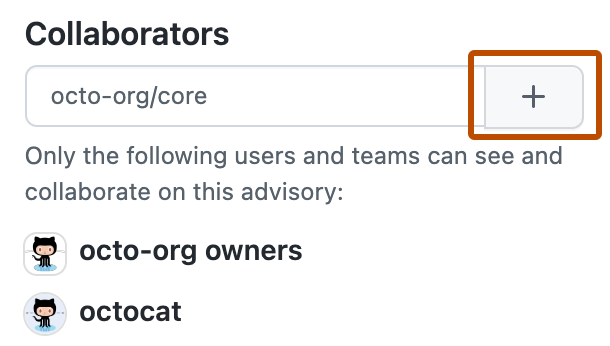
En la parte derecha de la página, debajo de "Colaboradores", teclea el nombre de usuario o equipo que quieras añadir a la asesoría de seguridad.
-
Haz clic en para agregar el usuario o equipo seleccionado como colaborador.