Corrección de alertas
Cuando un secreto se haya confirmado en un repositorio, deberás considerarlo en riesgo. GitHub recomienda las siguientes acciones para secretos en peligro:
- Compruebe que el secreto almacenado en GitHub es válido.
Se aplica solo a GitHub tokens. Consulte Comprobación de la validez de un secreto y Realización de una comprobación de validez a petición.
- En el caso de los secretos detectados en repositorios privados, notifique el secreto filtrado a GitHub, que lo tratará como cualquier secreto filtrado públicamente y lo revocará. Se aplica solo a GitHubpersonal access tokens activos o no confirmados. Consulte Informar sobre un secreto filtrado en un repositorio privado.
- Revise y actualice los servicios que usan el token anterior. Para GitHubpersonal access tokens, elimine el token en peligro y cree un nuevo token. Consulta Administración de tokens de acceso personal.
- En función del proveedor de secretos, compruebe los registros de seguridad en busca de cualquier actividad no autorizada.
Notificación de un secreto filtrado en un repositorio privado
Nota:
El proceso de informe de un secreto expuesto de forma privada a GitHub se encuentra en versión preliminar pública y está sujeto a cambios. La característica solo está disponible actualmente para GitHubpersonal access tokens (v1 y v2).
-
En GitHub, navegue hasta la página principal del repositorio.
-
En el nombre del repositorio, haga clic en la Security and quality pestaña . Si no puede ver la pestaña " Security and quality", seleccione el menú desplegable y, a continuación, haga clic en Security and quality.
-
En la barra lateral izquierda, en "Alertas de vulnerabilidad", haga clic en Secret scanning.
-
En la lista de alertas, haga clic en la alerta que desea ver.
-
En la vista de alertas del secreto filtrado, haga clic en Notificar filtración.
Nota:
Para evitar que se interrumpan los flujos de trabajo, considere la posibilidad de rotar primero el secreto antes de continuar, ya que la divulgación podría provocar la revocación del secreto. Si es posible, también debería ponerse en contacto con el propietario del token para informarle sobre la filtración y coordinar un plan de corrección.
-
Revise la información del cuadro de diálogo y, a continuación, haga clic en Comprendo la consecuencia, notificar este secreto.
Cierre de alertas
Nota:
Secret scanning no cierra automáticamente las alertas cuando se ha quitado el token correspondiente del repositorio. Debe cerrar manualmente estas alertas en la lista de alertas de GitHub.
-
En GitHub, navegue hasta la página principal del repositorio.
-
En el nombre del repositorio, haga clic en la Security and quality pestaña . Si no puede ver la pestaña " Security and quality", seleccione el menú desplegable y, a continuación, haga clic en Security and quality.
-
En la barra lateral izquierda, en "Alertas de vulnerabilidad", haga clic en Secret scanning.
-
En "Secret scanning", haga clic en la alerta que desea ver.
-
Para descartar una alerta, selecciona el menú desplegable "Cerrar como" y haz clic en un motivo para resolver una alerta.
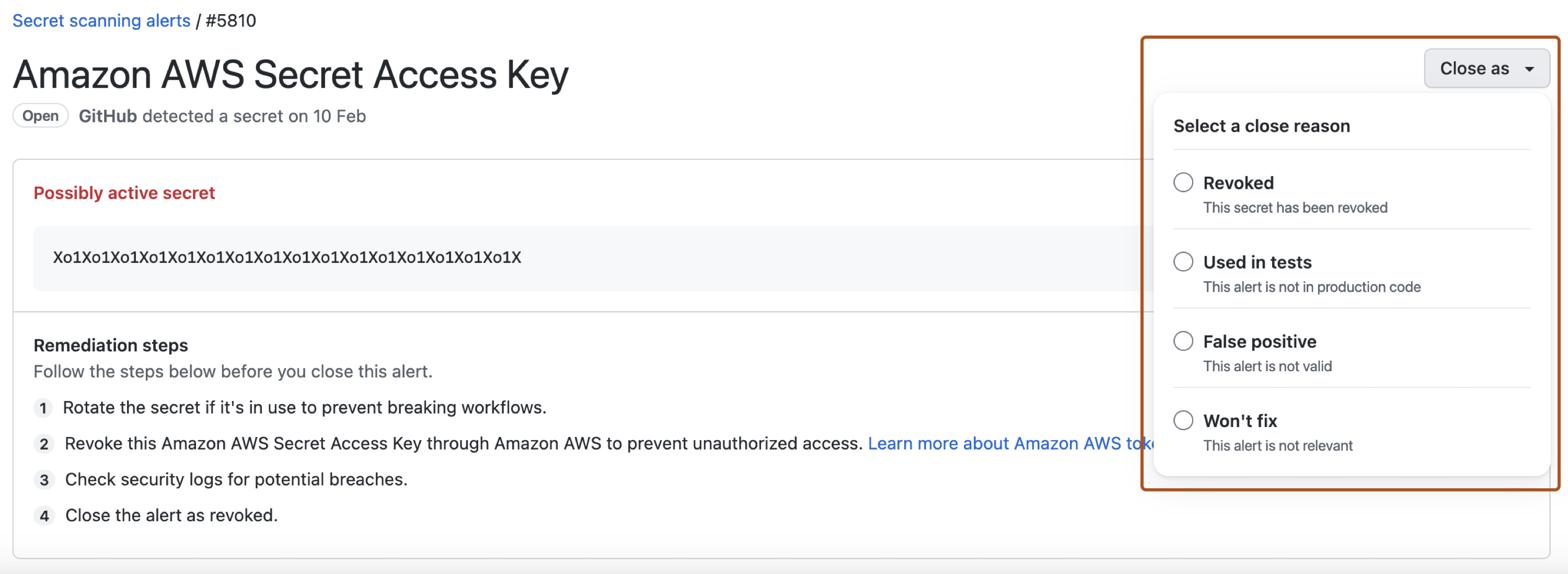
-
Opcionalmente, en el campo "Comentario", agrega un comentario de descarte. El comentario de descarte se agregará a la escala de tiempo de la alerta y se puede usar como justificación durante el proceso de auditoría y creación de informes.
-
Haz clic en Cerrar alerta.
