使用 GitHub 预设规则确定 Dependabot 警报的优先级

通过自动忽略 npm 依赖项的低影响告警,专注于重要告警。

谁可以使用此功能?

  • 组织所有者
  • 安全管理员
  • 具有“管理员”访问权限的用户(可以启用、禁用和查看存储库的 GitHub 预设)****

The Dismiss low impact issues for development-scoped dependencies rule is a GitHub preset that auto-dismisses certain types of vulnerabilities that are found in npm dependencies used in development. For more information about the rule, see About Dependabot auto-triage rules.

This rule is enabled by default on public repositories and disabled for private repositories. Administrators of private repositories can opt in by enabling the rule for their repository.

Enabling the Dismiss low impact issues for development-scoped dependencies rule for your private repository

You first need to enable Dependabot alerts for the repository. For more information, see Configuring Dependabot alerts.

  1. On GitHub, navigate to the main page of the repository.

  2. Under your repository name, click Settings. If you cannot see the "Settings" tab, select the dropdown menu, then click Settings.

    Screenshot of a repository header showing the tabs. The "Settings" tab is highlighted by a dark orange outline.

  3. In the "Security" section of the sidebar, click Advanced Security.

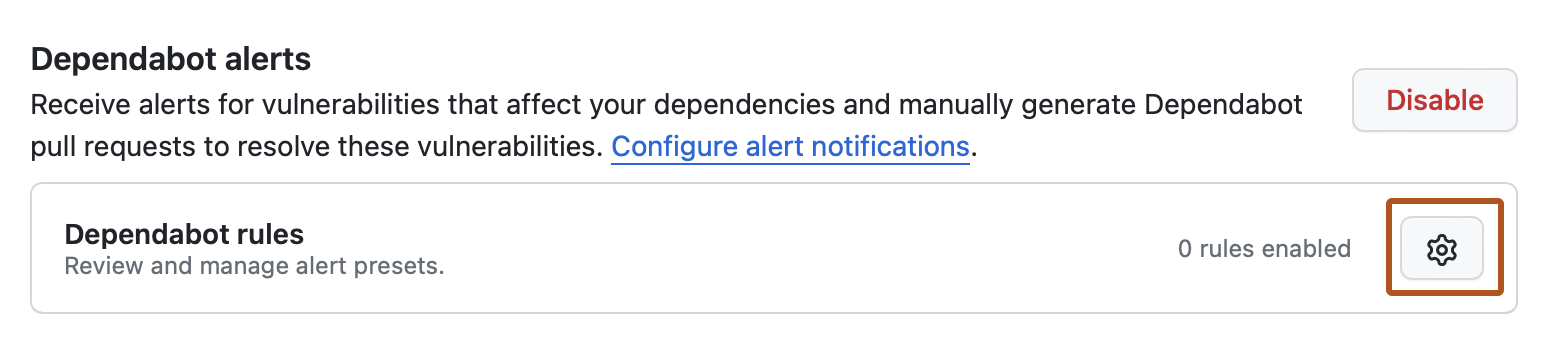
  4. Under "Dependabot alerts", click close to "Dependabot rules".

    Screenshot of the "Advanced Security" page for a repository. The gear icon is highlighted with an orange outline.

  5. Under "GitHub presets", to the right of "Dismiss low impact issues for development-scoped dependencies", click .

  6. Under "State", select the dropdown menu, then click "Enabled".

  7. Click Save rule.