-
En GitHub, navegue hasta la página principal del repositorio.
-
En el nombre del repositorio, haga clic en la Security pestaña . Si no puede ver la pestaña " Security", seleccione el menú desplegable y, a continuación, haga clic en Security.
-
En la barra lateral izquierda, en "Informes", haga clic en Directiva de seguridad.
-
Haga clic en Iniciar configuración.
-
En el nuevo archivo
SECURITY.md, agregue información sobre las versiones admitidas del proyecto y cómo notificar una vulnerabilidad. -
Haga clic en Confirmar cambios.
-
En el campo de "Mensaje de confirmación", escriba un mensaje de confirmación corto y significativo que describa la modificación que hizo en el archivo. Puedes atribuir el cambio a mas de un autor en el mensaje del mismo. Para más información, consulta Crear un commit con varios autores.
-
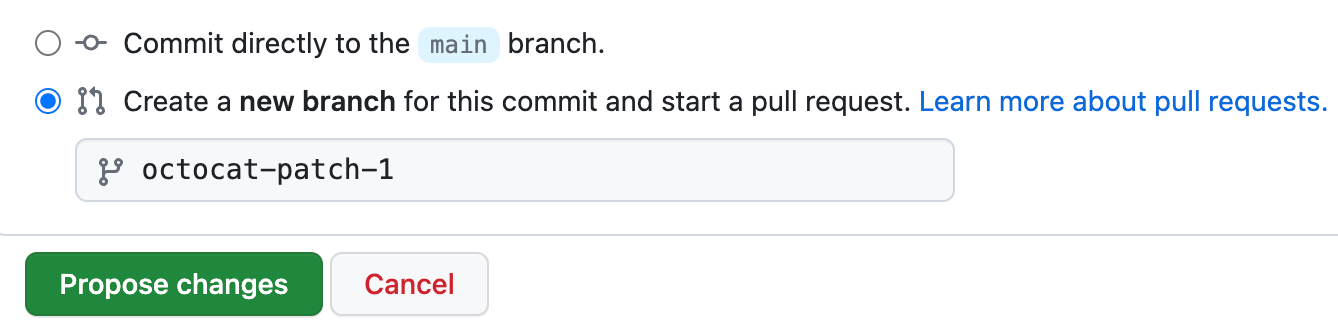
Debajo de los campos para el mensaje de confirmación, decide si deseas agregar tu confirmación a la rama actual o a una rama nueva. Debajo de los campos del mensaje de confirmación, decide si deseas agregar tu confirmación a la rama actual o a una nueva rama. Si tu rama actual es la rama predeterminada, debes elegir crear una nueva rama para tu confirmación y después crear una solicitud de extracción. Para más información, consulta Crear una solicitud de incorporación de cambios.
-
Haz clic en Confirmar cambios o Proponer cambios.
Agregar una política de seguridad a tu repositorio
Puedes dar instrucciones de cómo reportar una vulnerabilidad de seguridad en tu proyecto si agregas una política de seguridad a tu repositorio.
