Enterprise Server 3.20 目前作为发布候选版本提供。

共享来自 GitHub Enterprise Server 的贡献

你可以将来自 GitHub Enterprise Server 的贡献计数发送到你在 GitHub.com 或 GHE.com 上的个人资料。

重要

The connection between your accounts is governed by GitHub's Privacy Statement and users enabling the connection must agree to the GitHub Terms of Service.

Sending your enterprise contributions to your profile

Before you can connect your GitHub Enterprise Server profile to your GitHub.com or GHE.com profile, your enterprise owner must enable GitHub Connect and enable contribution sharing between the environments. For more information, contact your enterprise owner.

  1. Sign in to both your user account on GitHub Enterprise Cloud and your user account on GitHub Enterprise Cloud (GitHub.com or GHE.com).

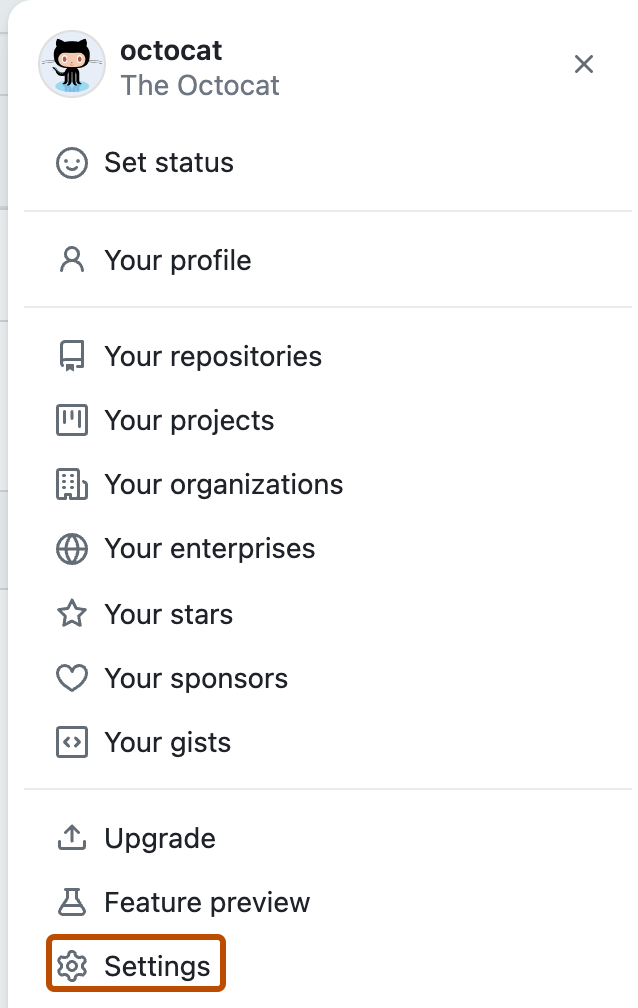
  2. On GitHub Enterprise Server, in the upper-right corner of any page, click your profile picture, then click Settings.

    Screenshot of a user's account menu on GitHub. The menu item "Settings" is outlined in dark orange.

  3. In the left sidebar, click GitHub Connect.

  4. Click Connect to GitHub.com.

  5. Review the resources that GitHub Enterprise Server will access from your GitHub.com or GHE.com account, then click Authorize.

  6. Under "Contributions", select Send my contribution counts to PLATFORM, then click Update contributions.