Using GitHub preset rules to prioritize Dependabot alerts

You can use GitHub 预设, which are rules curated by GitHub, to auto-dismiss low impact development alerts for npm dependencies.

谁可以使用此功能?

  • 组织所有者
  • 安全管理员
  • 具有“管理员”访问权限的用户(可以启用、禁用和查看存储库的 GitHub 预设)****

About GitHub 预设

The Dismiss low impact issues for development-scoped dependencies rule is a GitHub preset that auto-dismisses certain types of vulnerabilities that are found in npm dependencies used in development. These alerts cover cases that feel like false alarms to most developers as the associated vulnerabilities:

  • Are unlikely to be exploitable in a developer (non-production or runtime) environment.
  • May relate to resource management, programming and logic, and information disclosure issues.
  • At worst, have limited effects like slow builds or long-running tests.
  • Are not indicative of issues in production.

注意

Automatic dismissal of low impact development alerts is currently only supported for npm.

The Dismiss low impact issues for development-scoped dependencies rule includes vulnerabilities relating to resource management, programming and logic, and information disclosure issues. For more information, see Publicly disclosed CWEs used by the Dismiss low impact issues for development-scoped dependencies rule.

Filtering out these low impact alerts allows you to focus on alerts that matter to you, without having to worry about missing potentially high-risk development-scoped alerts.

The Dismiss low impact issues for development-scoped dependencies rule is enabled by default on public repositories and disabled for private repositories. Administrators of private repositories can opt in by enabling the rule for their repository.

Enabling the Dismiss low impact issues for development-scoped dependencies rule for your private repository

Dependabot alerts for your repository can be enabled or disabled by your enterprise owner. For more information, see 为企业启用 Dependabot.

  1. 在 GitHub 上,导航到存储库的主页面。

  2. 在仓库名称下,单击 “Settings”****。 如果看不到“设置”选项卡,请选择“”下拉菜单,然后单击“设置”。

    存储库标头的屏幕截图,其中显示了选项卡。 “设置”选项卡以深橙色边框突出显示。

  3. 在边栏的“Security”部分中,单击“ Code security”****。

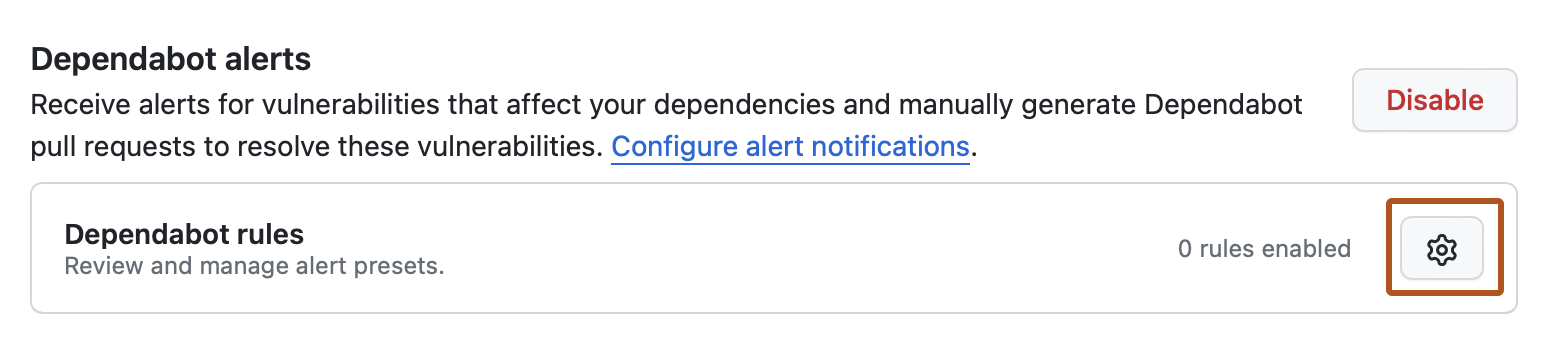
  4. Under "Dependabot alerts", click close to "Dependabot rules".

    Screenshot of the "Code security" page for a repository. The gear icon is highlighted with an orange outline.

  5. Under "GitHub presets", to the right of "Dismiss low impact issues for development-scoped dependencies", click .

  6. Under "State", select the dropdown menu, then click "Enabled".

  7. Click Save rule.

Publicly disclosed CWEs used by the Dismiss low impact issues for development-scoped dependencies rule

Along with the ecosystem:npm and scope:development alert metadata, we use the following GitHub-curated Common Weakness Enumerations (CWEs) to filter out low impact alerts for the Dismiss low impact issues for development-scoped dependencies rule. We regularly improve this list and vulnerability patterns covered by built-in rules.

Resource Management Issues

  • CWE-400 Uncontrolled Resource Consumption
  • CWE-770 Allocation of Resources Without Limits or Throttling
  • CWE-409 Improper Handling of Highly Compressed Data (Data Amplification)
  • CWE-908 Use of Uninitialized Resource
  • CWE-1333 Inefficient Regular Expression Complexity
  • CWE-835 Loop with Unreachable Exit Condition ('Infinite Loop')
  • CWE-674 Uncontrolled Recursion
  • CWE-1119 Excessive Use of Unconditional Branching

Programming and Logic Errors

  • CWE-185 Incorrect Regular Expression
  • CWE-754 Improper Check for Unusual or Exceptional Conditions
  • CWE-755 Improper Handling of Exceptional Conditions
  • CWE-248 Uncaught Exception
  • CWE-252 Unchecked Return Value
  • CWE-391 Unchecked Error Condition
  • CWE-696 Incorrect Behavior Order
  • CWE-1254 Incorrect Comparison Logic Granularity
  • CWE-665 Improper Initialization
  • CWE-703 Improper Check or Handling of Exceptional Conditions
  • CWE-178 Improper Handling of Case Sensitivity

Information Disclosure Issues

  • CWE-544 Missing Standardized Error Handling Mechanism
  • CWE-377 Insecure Temporary File
  • CWE-451 User Interface (UI) Misrepresentation of Critical Information
  • CWE-668 Exposure of Resource to Wrong Sphere