Enterprise Server 3.19 은(는) 현재 릴리스 후보로 제공됩니다.

조직에서 사용자의 역할 보기

조직의 사용자 목록을 보고 해당 역할별로 필터링할 수 있습니다.

누가 이 기능을 사용할 수 있나요?

Organization members

Viewing organization roles

  1. In the upper-right corner of GitHub, click your profile picture, then click Organizations.

  2. Click the name of your organization.

  3. Under your organization name, click People.

    Screenshot of the horizontal navigation bar for an organization. A tab, labeled with a person icon and "People," is outlined in dark orange.

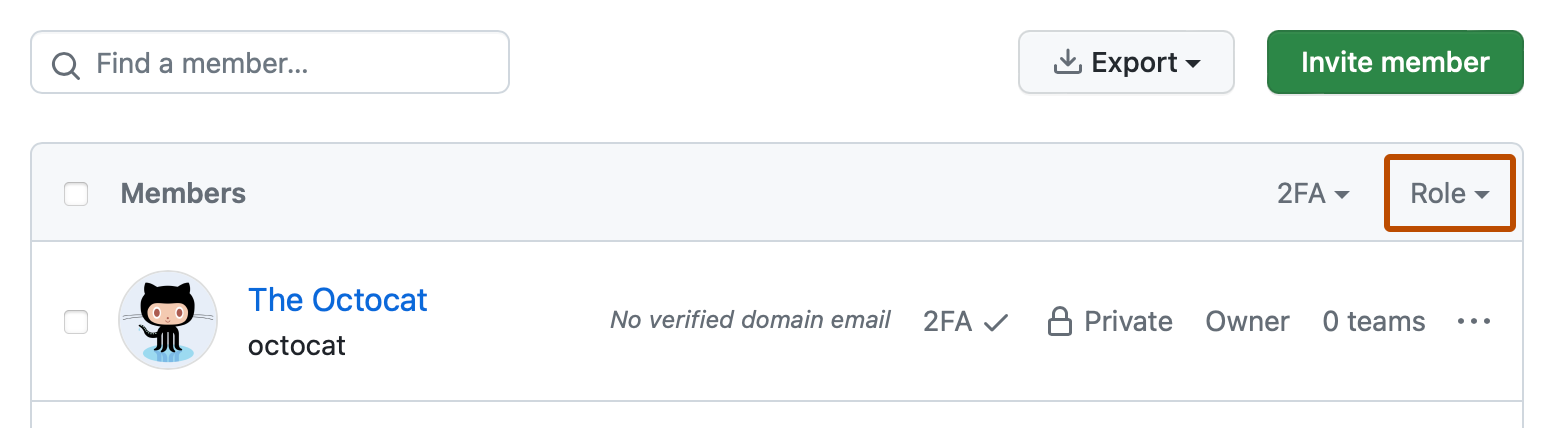
  4. To filter the list by role, select the Role dropdown menu and click a role.

    Screenshot of the list of organization members. In the header of the list, a dropdown menu, labeled "Role," is outlined in dark orange.

Viewing enterprise owners and their roles in an organization

  1. In the upper-right corner of GitHub, click your profile picture, then click Organizations.

  2. Click the name of your organization.

  3. Under your organization name, click People.

    Screenshot of the horizontal navigation bar for an organization. A tab, labeled with a person icon and "People," is outlined in dark orange.

  4. In the left sidebar, under "Enterprise permissions", click Enterprise owners.

    Depending on their organization role, enterprise owners have different levels of access to organization resources. For more information, see Managing your role in an organization owned by your enterprise.

Next steps

To learn more about organization roles, see Roles in an organization.