이 버전의 GitHub Enterprise Server는 다음 날짜에 중단됩니다. 2026-04-09. 중요한 보안 문제에 대해서도 패치 릴리스가 이루어지지 않습니다. 더 뛰어난 성능, 향상된 보안, 새로운 기능을 위해 최신 버전의 GitHub Enterprise Server로 업그레이드합니다. 업그레이드에 대한 도움말은 GitHub Enterprise 지원에 문의하세요.

project (classic)에 카드 보관

프로젝트(클래식) 카드를 보관하여 프로젝트의 기록 컨텍스트를 잃지 않고 워크플로를 정리할 수 있습니다.

참고

  • Projects, the all-new projects experience, is now available. For more information about Projects, see About Projects.
  • You can only create a new project (classic) for an organization, repository, or user that already has at least one project (classic). If you're unable to create a project (classic), create a project instead.

Automation in your project (classic) does not apply to archived project (classic) cards. For example, if you close an issue in a project (classic)'s archive, the archived card does not automatically move to the "Done" column. When you restore a card from the project (classic) archive, the card will return to the column where it was archived.

Archiving cards on a project (classic)

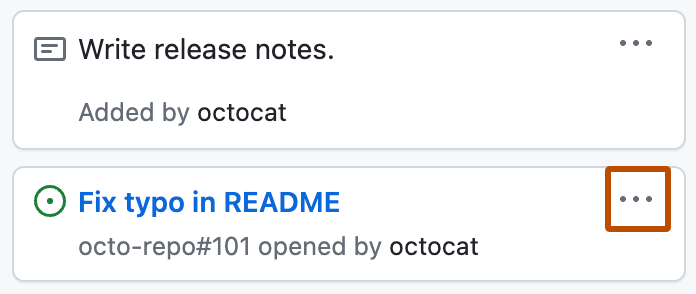
  1. In a project (classic), find the card you want to archive, then click .
    Screenshot showing a card on a project. The card menu icon is highlighted with an orange outline.
  2. Click Archive.

Restoring cards on a project (classic) from the sidebar

  1. On the top-right side of the project (classic), click Menu.
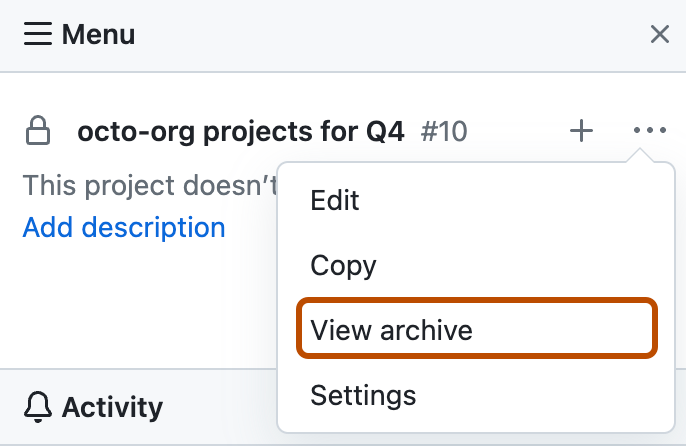
  2. Click , then click View archive.
    Screenshot showing the project menu. The "View archive" option is highlighted with an orange outline.
  3. Above the project (classic) card you want to unarchive, click Restore.